QWERTY Challenge
 40.1k
40.1k

Game Description
Want an engaging game that can improve typing skills over a keyboard? This easy-to-play and understand keyboarding game boosts typing accuracy.
Master the Keys With the Spooky-Fun
The QWERTY Challenge fun game enhances memory, speed, and accuracy on eye-catching Halloween-themed graphics. Learning keys’ positions does not have to be monotonous. Memorize the keyboard keys in an engaging and enjoyable way with this game.
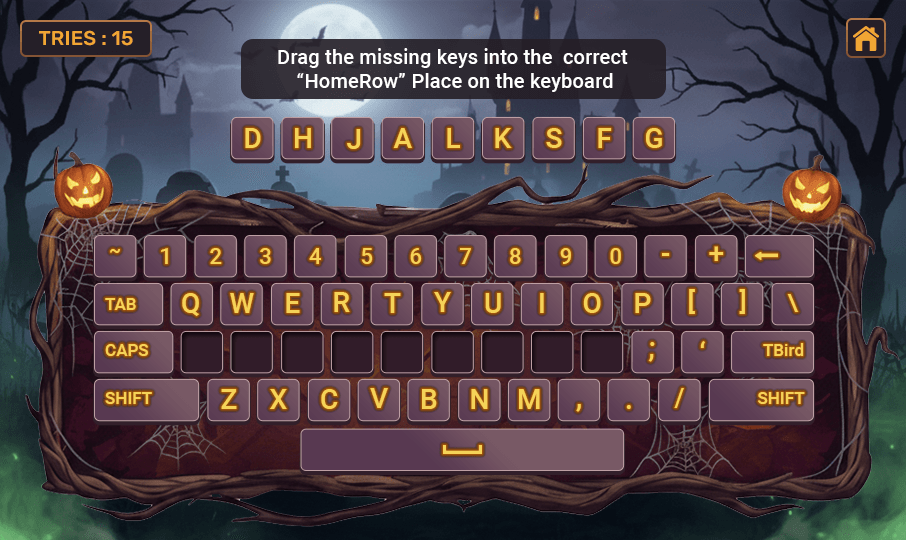
The mission is simple yet addictive: arrange the jumbled keys of a keyboard back into correct QWERTY positions. A right move takes you one step closer to accomplishing the keyboard reassembly task. The luminous pumpkins, eerie woods, and other Halloween graphics transform playtime into a mystical experience.
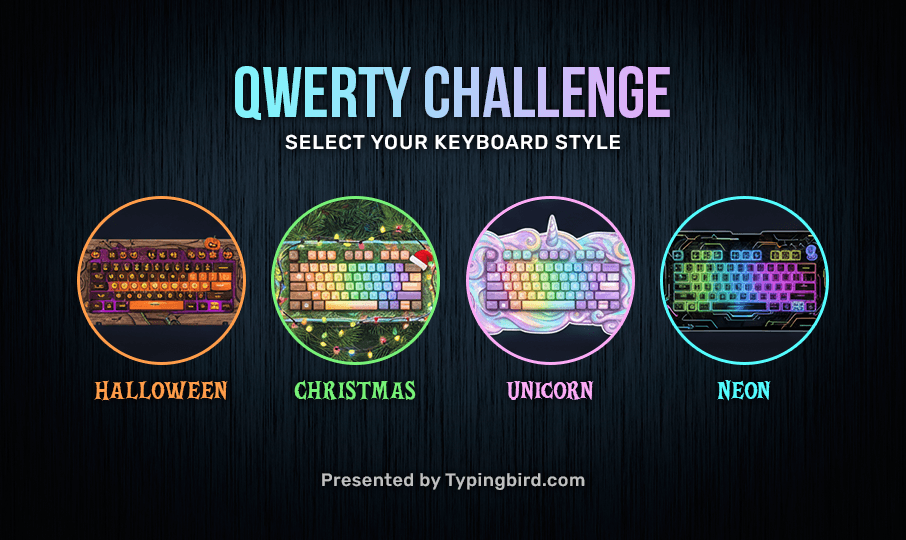
Do explore Christmas, Unicorn and Neon keyboard styles to fix your keyboard.
How to Play the Game?
This game around keyboard challenge has simple rules. Even the beginners level typer can play it .
- Choose the keyboard theme – Halloween, Christmas, Unicorn and Neon.
- Select the lesson type: Choose any option from Home Row, Top Row, Bottom Row, All Rows, or Numbers for practicing.
- Once the game begins, jumbled letters of the chosen options appear at the top of the screen. Drag the letter and drop it in the correct place on the virtual keyboard to arrange the keys.
- Restore the entire keyboard arrangement by replacing keys in their proper place.
- The scorecard displays the number of tries.
- The more precisely you remember the letter’s position on the keyboard, the fewer tries are needed to finish such easy keyboarding games.
Benefits of Playing the Game
This elementary typing game mixes entertainment through colorful graphics and education. It helps practice typing skills.
- Enhances keyboarding memory: Players get to learn the letters and numbers position on the keyboard. This reduces the need to look down while typing.
- Improves Concentration: Keys appear in jumble form when you start a game round. The player must remain focused, which enhances concentration power.
- Sharpens typing foundation: For kids developing typing skills, this game familiarizes them with key locations in a fun way, boosting their typing speed.
Typing practice on keyboard need not be boring. Play the QWERTY Challenge puzzle game online for free as long as you want, no need to download or sign up !
Screenshots:
QWERTY Game Intro
Halloween Typing Game
QWERTY Challenge

Want an engaging game that can improve typing skills over a keyboard? This easy-to-play and understand keyboarding game boosts typing accuracy.
Master the Keys With the Spooky-Fun
The QWERTY Challenge fun game enhances memory, speed, and accuracy on eye-catching Halloween-themed graphics. Learning keys’ positions does not have to be monotonous. Memorize the keyboard keys in an engaging and enjoyable way with this game.
The mission is simple yet addictive: arrange the jumbled keys of a keyboard back into correct QWERTY positions. A right move takes you one step closer to accomplishing the keyboard reassembly task. The luminous pumpkins, eerie woods, and other Halloween graphics transform playtime into a mystical experience.
Do explore Christmas, Unicorn and Neon keyboard styles to fix your keyboard.
How to Play the Game?
This game around keyboard challenge has simple rules. Even the beginners level typer can play it .
- Choose the keyboard theme – Halloween, Christmas, Unicorn and Neon.
- Select the lesson type: Choose any option from Home Row, Top Row, Bottom Row, All Rows, or Numbers for practicing.
- Once the game begins, jumbled letters of the chosen options appear at the top of the screen. Drag the letter and drop it in the correct place on the virtual keyboard to arrange the keys.
- Restore the entire keyboard arrangement by replacing keys in their proper place.
- The scorecard displays the number of tries.
- The more precisely you remember the letter’s position on the keyboard, the fewer tries are needed to finish such easy keyboarding games.
Benefits of Playing the Game
This elementary typing game mixes entertainment through colorful graphics and education. It helps practice typing skills.
- Enhances keyboarding memory: Players get to learn the letters and numbers position on the keyboard. This reduces the need to look down while typing.
- Improves Concentration: Keys appear in jumble form when you start a game round. The player must remain focused, which enhances concentration power.
- Sharpens typing foundation: For kids developing typing skills, this game familiarizes them with key locations in a fun way, boosting their typing speed.
Typing practice on keyboard need not be boring. Play the QWERTY Challenge puzzle game online for free as long as you want, no need to download or sign up !
Screenshots:
QWERTY Game Intro
Halloween Typing Game
Related Products
-

-
57.6k
-
65.2k
-
69.3k



Related Games
-
50.8k
-
48.7k
-
81.3k
-
48k